Showing posts with label bald eagle. Show all posts

Thursday, July 14, 2011

Going Back Out for More


Heading back out onto the water this afternoon for another photo tour of south east Alaska's amazing scenery and wildlife.  Took a quick a break in Petersburg after the first trip.  I needed a little time to catch up on sleep as we were shooting all day for over a week.

We had another incredible trip filled with amazing photography, incredible camaraderie, good food and wine, and pure fun. I look forward to sharing some of the images we made and the techniques used to capture them once I get back down to Cali. 

 Lion's Mane


 Humpback tail and barnacles


Rolling in


Fiat Lux!

Tuesday, May 24, 2011

"Mask" with Blend Modes for Easy Composites


The two images above do not really work for me separately.  I thought they might look better combined so I played around with them a bit.  I am not a big fan of spending a large amount of time selecting or masking unless I absolutely must.  When I do mask I use either Photoshop alone or Topaz Remask.  For this composite, I wanted to try a blend mode switch and see if I could avoid any selections or masks.  The process I used is below.


The first step was to create a stack by layering the two images in Photoshop.  I used the trees as a background and added a few Curves Adjustment Layers to fix tonal range, color cast, and add contrast (you could also do that in Lightroom first.)  At the top of the layer stack is my eagle fight shot.  I moved the eagles into a possible position and am now ready to try a blend mode switch.


With the eagle layer active I changed the blend mode to Darken.  The Darken blend mode works by displaying only the parts of the active layer that are darker than underlying pixels (in lower layers.)  I thought the eagles are darker than the sky so maybe it would work.  Unfortunately, the sky in the eagle layer is darker than the background sky.


To fix this little issue, I added a Curve Adjustment Layer and set it to affect only the eagle layer.  To do this click on the the click to clip to layer icon that looks like a dark circle on top of a light circle at the bottom of the Adjustments panel or hold down the Alt/Opt key and click on the line separating the eagle layer from the Curve layer (you will know you are in the right place when your cursor changes to the dark/light circle icon.)  When we set up a clipped layer the adjustment will only effect the layer it is clipped to.  In this case, the curve only modifies the eagle.  As I drag the curve up notice less of the sky around the eagles is visible.


I continued to move the curve up until the sky on the eagle layer was lighter than the sky of the background.  Now only the eagles themselves show up with the Darken blend mode.


Final step for me was a Black and White adjustment layer.  Not sure I will ever use the image but I like the result better than where I started and the technique is a great tool to have in your kit.  This also works in reverse using the Lighten blend mode.

The final composite

Fiat Lux!

Thursday, May 19, 2011

Eagle Tips

Dial it up (as we used to say at TOPGUN)

As many of you know I am a big fan of photographing eagles (might be that fighter pilot thing again.)  There are a huge number of tips and tricks when shooting eagles but I will give two of the simplest.  These two might seem a little bit flippant and MOTO (master of the obvious) but they are true.


My best tip is go where there are a large number of eagles.  The rock above has 19 eagles on it.  What is not shown are the other 30 rock outcroppings just like this one covered with birds or the trees full of birds.  When you surround yourelf with 500-1000 eagles you will have a much higher probability of getting the shots you want.  Photographing eagles in flight is not the easiest task so the more you shoot the better.  Tough to do as you wait for the lone bird to fly by again.


Tip number two often goes hand in hand with number one, go where this is a non-stop supply of eagle food.  I have no problem with feeding eagles to get images but there is a finite amount of frozen herring.  Food equals eagle action.  The birds will feed almost non stop.  I have seen eagles feed until there are fins sticking out their beaks.  With plenty of birds and food you increase your opportunity in a major way.  In the image above the fish are literally jumping out of the water into the waiting talons of the approaching eagle.  There is also something a little more raw and natural about a freshly ripped apart herring; half in the beak and half in the talons.  In the gory image above note there is another whole herring in the talons as well.

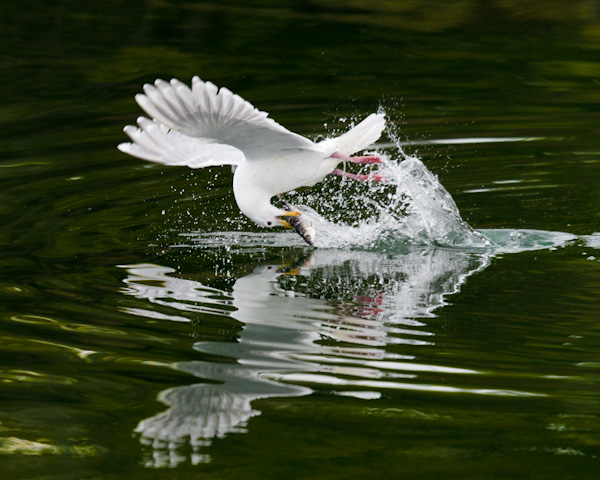
As I mentioned, feeding to attract eagles is not really any different than planting flowers to attract butterflies or using sugar water to bring in hummingbirds to an elaborate flash setup.  I do believe in full disclosure though and will discuss if an eagle was baited or not.  Most often it is pretty easy to tell if there is a fish in the frame (in the water or in the talons/beak.)  Recently caught live fish bleed and still look alive.  Frozen herring are slightly discolored, the tail contracts, and the eye is very dead.  For example, check out the gull below picking up a frozen herring.


A few more shots for giggles.


 Yep, the sky was that blue.


Love the dirty birds (juveniles)!
Notice the bright spot in the talons.  Normally a piece of bait...as it is here.


Fiat Lux!