
Showing posts with label HDR. Show all posts
Showing posts with label HDR. Show all posts
Thursday, August 11, 2011
Recent Topaz Webinar is Up for Review
Topaz Labs just posted the webinar I did with them a couple weeks ago. Enjoy and, as always, send me any questions, comments, or concerns.
Fiat Lux!
Bull


Sunday, June 12, 2011
Blending Landscape Exposures with Marc Muench

This weekend we are happy to have Marc Muench here to teach Light students the latest tips and techniques in exposure blending. Last night we shot along the Bluff Trail in Montaña De Oro State Park to gather images for HDR processing.
The fog left us alone just long enough to get some great shots of the sunset.

Today we'll be using the images from last night to explore the different ways to blend multiple exposures together to create stunning High Dynamic Range images.
We hope to have Marc back soon for another awesome workshop.
There will be more HDR learning opportunities during the California Photo Festival Oct. 12-16, 2011.
Check out our website www.LightWorkshops.com to see the rest of our summer workshops. 

Fiat Lux!
Monday, May 23, 2011
Couple of HDRs and Component Pre-Processing Tips

Bridge shot from Lightroom, Photomatix Pro, Photoshop, and Topaz
Lens is a 400mm f/2.8L AKA "killer glass"
I showed a Nik HDR Efex Pro processed ice cave the other day and wanted to balance that with a couple of Photomatix Pro HDRs.
Both images started in Lightroom where I processed the components. My workflow includes removing any of the default settings in the Develop Module that effect tonality. From top to bottom I do the following: Blacks-0, Brightness-0, Contrast-0, Tone Curve's Point Curve-Linear, Detail's Sharpening Amount-0, and Lens Correction to remove vignetting and chromatic aberration. I will warn you here, after you make those adjustments the components will not look good.
You can easily make a Preset and the process goes much quicker.

Once the image returns from Photomatix I will go through my normal optimization workflow. This often returns the above sliders and options to near their default.
In the case of these two images, I processed them twice in Photomatix, adjusted in Lightroom, and then combined the two in Photoshop. For the interior shot I also used Topaz Detail to add some shape and form.
Fiat Lux!
Saturday, June 13, 2009
HDR, Panoramas, Gigapan and More!

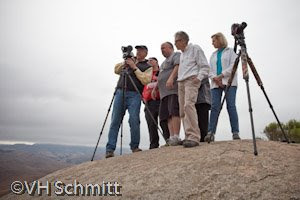
Today started with a 5am meeting at the top of Black Hill in Morro Bay. The goal was to get some great Time Lapse images of the fog coming in over Morro Rock as George has recorded for years. While George's time lapse series was up and running (for 5 hours, 12 frames every minute taken with a Canon 1D Mark III, 24-105mm and a TC 80N3 timer remote), we instructed our students on how to take proper panoramas in the field. With the gracious donations from Really Right Stuff (of various plates) we were able to get everyone in on some incredible panos from about 600 feet above Morro Bay and the Baywood/Los Osos estuary.


Then, George treated us with 2 set-ups from Gigapan (pictured above). Gigapan takes multiple images (today around 40-70 images per gigapan session) and created awesome high depth, high quality panoramas. It's just like taking 4 panoramas to eventually stitch altogether in one image! But this "Gigapan" get-up does it all for you. You plug in the starting point (upper left of the overall image) then plug in the ending point (lower right point of the overall image). Then you press start and away it goes... taking tons of images to create one very large gigapan.
Take a look at George's website to see a few examples, or go to Gigapan's website where they feature some additional gigapan's that George has done withe their contraption. Thanks to Peggy from The Photoshop in San Luis Obispo, we were able to have 2- Canon G10's on hand to create several Gigapan's of Morro Bay.
After taking several panoramas and HDR images of the area we headed to a greasy spoon called Kathy's Country Kitchen where we were entertained by a surprise drizzle on the patio and some very filling biscuits, omelette's and pancakes..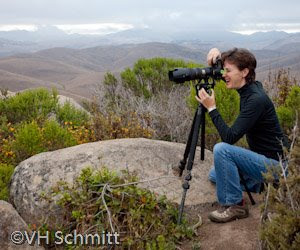

When we returned to the school, we were able to download the "gigs" of images and started on our next feat. Orchid Gigapans.
By tomorrow we are going to have some incredibly detailed and large panoramas of the beautiful orchids that George and Kathy purchased for this portion of the workshop.
By tomorrow we are going to have some incredibly detailed and large panoramas of the beautiful orchids that George and Kathy purchased for this portion of the workshop.
We set up about 2-4 580EXII or 580 Ex strobe flashes against our white studio walls and 1 black background, and were able to isolate three different amazing and locally grown orchids.
One set up had two strobes blowing out the wall, two strobes with our amazingly creative diffusers to light the orchids with a beautiful soft light (made from plastic plates and tissue paper left over from our on-the-scenes family Christmas photo in Virginia...just for the fun of it) and one strobe back lighting the orchids. 5D Mark2 with a 180mm Macro lens all rigged up with a series of Really Right Stuff plates (ask RRS for details on the specific plates used this weekend.)
The second set-up was another white wall, but this time the orchids had a slightly harsher light from the MT-24 twin lights on our 180mm macro lens. Two strobes to blow out the background and one strobe to back light the orchids.
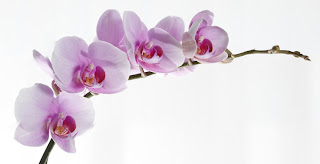
The final set up was a black background, 180mm Macro with the twin light set up an one strobe to back light, and our Induro tripod from MAC group. Lessons were truly learned and we are still processing our images in time to print tomorrow with Canon Rep Scott Jo. We are expecting to print our images at about 4'x12' prints (depending on a traditional pano or gigapan) on our Canon iPF 8100.
Stay Tuned to see our final images!
Thanks for reading!
Victoria
P.s. Are you following us yet?...c'mon! Join in on the list! Also, check us out on twitter! I'm photoshopv and Hal updates LightWorkshops.
Subscribe to:
Posts (Atom)